Identity Management Explained: Key Takeaways
- Identity and access management (IAM) ensures the right users can access the right resources, whether they’re working on-site or remotely
- The four pillars of IAM include authentication, authorization, administration, and auditing
- A well-implemented IAM strategy reduces risk and boosts efficiency
With 14% of U.S. employees working remotely in 2024, traditional on-premises security no longer holds up.
Identity and access management (IAM) bridges that gap by verifying users and enforcing access control across all environments, whether employees are in the office, at home, or on the move.
In this article, we will:
- Learn how identity and access management works across modern environments
- Uncover the four core pillars that make IAM effective and secure
- Find the key benefits of strong IAM security for your organization
- Explore Forgepath’s identity and access management services organizations can utilize
How Does Identity and Access Management (IAM) Work?
Identity and access management (IAM) is the process of ensuring the right people get access to the right resources.
IAM verifies who a user is and determines what they can access, whether it’s email, databases, files, or applications. This forms the foundation of effective IAM security.
IAM has two core functions:
- Identity management, which verifies who users are
- Access management, which determines what resources they can access and under what conditions
Both functions work together to protect systems like email, databases, files, and apps, ensuring that access is appropriate, secure, and aligned with business needs.
1. Identity Management
The first step in IAM is identity management, which confirms that a user is who they claim to be.
The system does this by checking login credentials, such as a username and password, against a centralized identity database.
This database is regularly updated and contains key user information, including:
- Employee names
- Job roles
- Department affiliations
- Manager relationships
- Contact details, such as phone numbers and email addresses
Once the system matches the login credentials with a valid identity in the database, it completes the authentication process.
To enhance security, most organizations implement multi-factor authentication (MFA).
With MFA, users are required to provide a secondary verification method, typically a one-time code sent via text message or email.
This additional step helps protect against stolen credentials and prevents unauthorized access
2. Access Management
Once a user is verified, the system decides what they’re allowed to access. This process, called authorization, limits access to only what each user’s role requires.
Access levels vary across an organization and are typically based on factors such as:
- Job title or department
- Current projects or team assignments
- Level of security clearance
The IAM system applies these rules consistently, making sure authentication and authorization are accurate and secure every time someone logs in.
The Four Core Pillars of Identity and Access Management
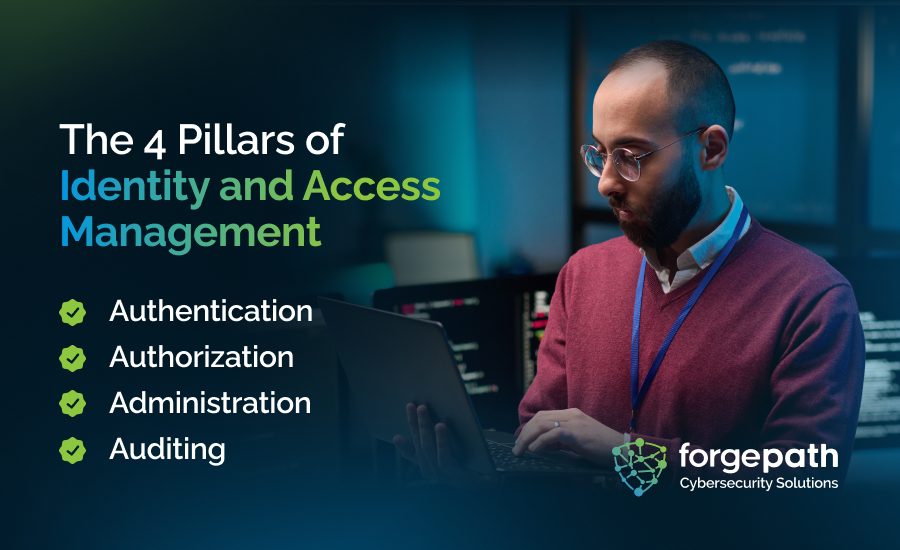
Effective IAM relies on four foundational pillars: authentication, authorization, administration, and auditing.
These functions ensure that only the right users access the right resources at the right time and under the right conditions.
1. Authentication
Authentication confirms a user or device is who they say they are. It answers the basic question: “Can we trust this identity?”
This can involve passwords, biometrics, security tokens, or multi-factor authentication (MFA).
2. Authorization
Once identity is verified, authorization decides what the user can actually access and do.
It’s often driven by access models like role-based access control (RBAC) or attribute-based access control (ABAC), which assign permissions based on roles, responsibilities, or other user attributes.
3. Administration
Administration handles the full lifecycle of user identities, creating accounts, setting permissions, updating roles, and removing access when someone leaves or changes positions.
It’s how organizations keep access aligned with real-time needs.
4. Auditing
Auditing tracks who accessed what, when, and from where. These logs are critical for spotting unusual behavior, enforcing policies, and proving compliance with privacy and security regulations.
Core Capabilities of Identity and Access Management
These are the core IAM capabilities that secure identities, enforce access policies, and support compliance, alongside specialized tools like privileged access management (PAM) to control high-risk accounts.
1. Grant or Block Access to Resources
IAM systems manage who can access sensitive apps and data and under what conditions.
Advanced IAM solutions use context-aware controls to set smart access rules, like limiting access to business hours, trusted devices, or specific locations.
2. Restrict Access to Development Platforms
Organizations often use IAM to control who can access development, testing, or staging environments.
This helps ensure only the right teams, like developers, engineers, or QA specialists, can make changes or view pre-release data.
3. Prevent Unauthorized Sharing of Sensitive Data
IAM also helps prevent unauthorized data sharing. With role-based access control (RBAC), you can limit who’s allowed to create, change, or transmit data.
For example, a temporary employee might have access to view internal files but not share them outside the company.
4. Provide Useful Reporting
IAM tools generate detailed reports that help prove compliance with data regulations.
These reports also give IT and security teams visibility into how resources are used, making it easier to fine-tune permissions, reduce risk, and support employee productivity.

Key Benefits of IAM Security
A well-implemented IAM solution delivers measurable value across security, productivity, compliance, and IT efficiency.
1. Access Control for the Right Users
According to the Cost of a Data Breach 2024 report, compromised credentials cause 16% of breaches.
Identity access management mitigates this risk by enforcing strict, role-based access.
With RBAC, users get only the permissions they need, minimizing exposure and scaling access control without manual effort.
2. Secure Access Without Slowing Productivity
While strong security is essential, it shouldn’t come at the expense of user experience.
IAM tools like single sign-on (SSO) and unified user profiles streamline the login process, allowing employees to access cloud apps, on-prem systems, and third-party tools with a single set of credentials.
This minimizes login fatigue and boosts daily productivity.
3. Stronger Protection Against Breaches
Strong IAM security lowers the risk of breaches by adding safeguards like multi-factor authentication and passwordless authentication.
These layers go beyond easily compromised credentials, reducing exposure to unauthorized access.
4. Data Encryption and Conditional Access
Many IAM platforms offer built-in encryption and conditional access to enforce context-based restrictions, evaluating device, location, and risk signals before granting entry.
Even if data is intercepted or credentials are compromised, encryption and real-time checks prevent unauthorized access and limit attacker movement.
5. Less IT Workload Through Automation
Identity access management takes routine tasks off IT’s plate, like password resets, account unlocks, and access reviews, by automating them.
It also provides real-time visibility into user activity, making it easier to catch unusual behavior early. That means better security and more time for IT to focus on bigger priorities, like rolling out Zero Trust.
6. Secure Collaboration
Imagine letting an employee go and instantly revoking their access to all systems. No manual cleanup, lingering credentials, or security gaps.
Identity access management makes that possible.
It enforces consistent, role-based controls that protect sensitive systems while enabling efficient collaboration across employees, contractors, and partners.
7. Support for Regulatory Compliance
Identity access management supports compliance by enforcing visibility and control over data access.
It tracks who accesses data, where it’s stored, how long it’s kept, and how it’s deleted, even across third-party SaaS tools.
This helps meet standards like GDPR, HIPAA, and CCPA through secure, accountable IAM security practices.
Discover Identity and Access Management Services at Forgepath
Forgepath delivers enterprise-grade identity management solutions tailored to modern security needs.
Our services help organizations enforce precise access control, streamline user provisioning, and strengthen overall IAM security.
From Zero Trust architecture to seamless offboarding and hybrid access control, Forgepath helps you build IAM solutions that are secure, scalable, and compliance-ready.
Contact us today to learn how our identity and access management experts can support your security goals.
Identity Management: FAQs
Why does IAM matter to organizations?
IAM might not make an organization breach-proof, but it does make it far more resilient.
Key reasons IAM is critical:
- Controlled access to sensitive resources: IAM lets organizations grant access only to the people and devices that need it, reducing the risk of internal or external misuse.
- Defense against evolving threats: Phishing and credential theft remain top causes of data breaches. IAM helps prevent these attacks by limiting what compromised accounts can access.
- Visibility and control: Without IAM, it’s difficult to track who has access to what, and nearly impossible to revoke access quickly during a breach.
- Reduced impact of security incidents: Advanced IAM solutions, often powered by AI, can detect suspicious behavior in real time and block threats before they escalate.
- Business continuity during breaches: IAM allows organizations to isolate threats without locking down entire systems, maintaining operations while addressing incidents.
What is an example of IAM?
Consider a contributor logging into a content management system (CMS).
When they enter their username and password, the IAM system checks those credentials against its identity database.
If they match, the system confirms the user’s identity and grants the appropriate level of access, such as permission to submit or edit content.
What are IAM technologies and tools?
IAM technologies and tools are the systems, protocols, and standards that enable organizations to securely manage digital identities and control access to resources.
Common IAM tech and tools include:
- Single Sign-On (SSO): Allows users to access multiple applications with one set of credentials.
- OpenID Connect (OIDC): An identity layer built on OAuth 2.0, used to verify users and share identity information securely via tokens.
- System for Cross-Domain Identity Management (SCIM): Automates user provisioning and deprovisioning across apps and services.