Application Penetration Testing: Key Takeaways
- Application penetration testing helps you uncover hidden vulnerabilities, stay compliant, evaluate how well your infrastructure holds up against real-world attacks
- Successful application pen testing requires clear scope, legal approval, certified testers, and compliance alignment
- Application pen testing typically involves three phases: preparation, execution, and analysis
Did you know that 69% of organizations perform penetration testing to support risk assessment and remediation prioritization?
They conduct application penetration tests to identify real-world threats, validate the effectiveness of existing controls, and prioritize fixes based on actual exploitability, not just theoretical risk.
In this guide, we will:
- Explain why application penetration testing is critical in compliance-driven industries
- Cover the requirements and step-by-step process for effective testing
- Discover how Forgepath can help strengthen your application security posture with expert-led penetration testing
Why Application Penetration Testing Matters in Compliance-Driven Environments
Application penetration testing is essential for preventing security breaches, improving defenses, and staying compliant, especially in industries where data integrity and uptime are non-negotiable.

In 2023, the average cost of a data breach in the healthcare sector hit $4.45 million, according to IBM. In the financial industry, overlooked vulnerabilities often lead to failed audits and steep compliance fines.
1. Uncovers Hidden Vulnerabilities
Application penetration testing identifies flaws that automated scans often miss, such as logic errors, misconfigurations, or insecure integrations.
2. Validates Existing Security Controls
Application penetration testing evaluates the effectiveness of firewalls, authentication mechanisms, and encryption protocols under pressure, helping confirm whether your defenses work as intended.
3. Reduces Risk of Data Breaches
Application penetration testing identifies vulnerabilities and weaknesses in a system by simulating real-world cyberattacks, such as:
- SQL injection
- Cross-site scripting (XSS)
- Authentication bypasses
- Privilege escalation
- Insecure session management
When penetration testers identify vulnerabilities early, organizations can patch issues before attackers exploit them, reducing data exposure and reputational risk.
4. Supports Regulatory Compliance
Application penetration testing is a mandated control in several regulated industries, including finance (PCI DSS) and healthcare (HIPAA).
Conducting regular web application tests helps demonstrate compliance by validating that systems can withstand real-world attack scenarios.
5. Improves Incident Response Readiness
Application penetration testing often reveals how your systems and teams respond under attack, giving you the chance to fine-tune detection, escalation, and recovery procedures.
6. Enhances DevSecOps Practices
Application security testing supports a shift-left approach by identifying vulnerabilities early in the SDLC.
While full-scale penetration tests are typically run outside CI/CD pipelines, automated tools like SAST and DAST are often integrated to catch issues during development and staging.
This reduces remediation costs and embeds security into agile delivery.
Web Application Penetration Testing Tools
Web application penetration testing tools help security teams identify and exploit vulnerabilities in web-based systems before attackers do.
They can include:
- Information gathering
- Planning analysis
- Vulnerability detection
- Penetration testing
- Reporting
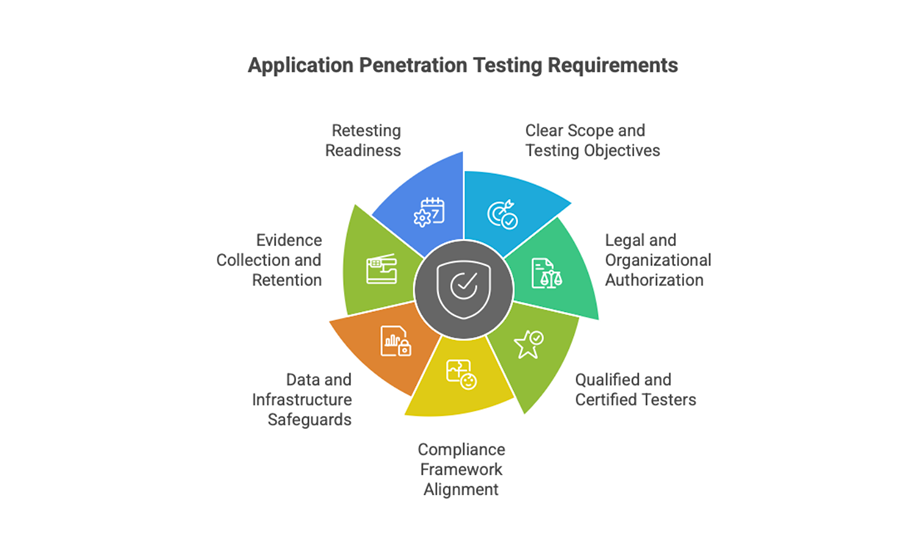
7 Application Penetration Testing Requirements
Before launching any application penetration test, organizations must ensure foundational conditions are in place to protect systems, satisfy compliance obligations, and maximize test value.
These requirements establish the boundaries, legitimacy, and safety of your testing efforts.
Requirements can include:
1. Clear Scope and Testing Objectives
Your team must define which applications, endpoints, and data flows will be tested, along with specific goals, such as compliance validation, risk prioritization, and control verification.
Ambiguity at this stage leads to incomplete coverage or operational missteps.
2. Legal and Organizational Authorization
Testing must be explicitly approved by system owners, legal teams, and any impacted stakeholders.
Without written authorization, testing could violate internal policies or external regulations.
3. Qualified and Certified Testers
Only trained professionals, such as those with OSCP or GPEN certifications, should conduct application penetration testing.
Their expertise ensures safe execution, meaningful results, and accurate reporting.
4. Compliance Framework Alignment
The test should map to applicable standards and controls, such as PCI DSS Requirement 11.3, HIPAA security rule safeguards, or ISO/IEC 27001 audit requirements.
Aligning your test strategy ensures results support regulatory outcomes.
5. Data and Infrastructure Safeguards
Testing environments must be isolated or at least protected with containment controls. Sensitive data should be masked or anonymized, and rollback plans must be in place to mitigate unintended disruptions.
6. Evidence Collection and Retention
Organizations must retain artifacts such as test logs, scope approvals, vulnerability data, and remediation timelines. These records support both internal audits and external compliance reviews.
7. Retesting Readiness
Before closure, you must plan for a second round of testing to validate whether previously discovered vulnerabilities were properly fixed and that no new risks were introduced during remediation.
How To Perform Application Penetration Testing
Penetration testing for web applications typically involves three core phases: preparation, execution, and analysis.
1. Define Scope and Objectives
Start by clearly outlining what you’re testing and why, as your goals will determine the types of tests to run.
Are you validating compliance with standards like PCI DSS or assessing the overall security posture of your web app?
At this stage, collect technical details such as application architecture, API endpoints, authentication methods, and infrastructure layout to inform the testing process.
2. Simulate Real-World Attacks
With the scope set, conduct simulated attacks to identify exploitable weaknesses. Common testing approaches include:
- External testing: Targets internet-facing components (e.g., web apps, login portals) to assess how an attacker might breach your defenses from outside the network.
- Internal testing: Mimics a scenario where an attacker has gained internal access, for example, via a compromised account or insider threat, to uncover flaws behind your perimeter security.
3. Analyze Findings and Prioritize Fixes
Once testing is complete, review the results to identify vulnerabilities, data exposure risks, and configuration issues.
Collaborate with development and security teams to prioritize fixes based on severity and potential impact.
This step turns raw test data into actionable remediation efforts that strengthen overall application security.

Common Challenges and Mistakes of Application Penetration Testing
Even with the right tools and processes, organizations can undermine their efforts by overlooking key aspects of effective testing.
These common mistakes reduce the impact and accuracy of a penetration test and might leave critical vulnerabilities unaddressed.
1. Testing Only in Production
Relying solely on production environment tests increases risk and limits flexibility.
Organizations should test in staging or pre-production environments to identify issues earlier, without putting live systems at risk.
2. Failing To Define Scope Clearly
Unclear scope leads to incomplete assessments or wasted effort.
Every test should define which applications, endpoints, and risks to target, along with any exclusions, to ensure meaningful, actionable results.
3. Not Retesting After Fixes
Identifying vulnerabilities is just the beginning.
If you skip retesting after applying fixes, you risk leaving behind regressions, partial patches, or even new issues introduced during remediation.
Always perform follow-up testing to confirm that vulnerabilities are fully resolved.
4. Ignoring Business Logic Vulnerabilities
Automated scans rarely detect flaws in application logic, such as improper access control, transaction manipulation, or workflow abuse.
Manual testing is essential for uncovering these complex, high-impact issues.
How DAST and SAST Support Application Penetration Testing
While not replacements for manual testing, DAST and SAST are essential tools that complement application penetration testing.
They help identify code-level and runtime vulnerabilities earlier in the SDLC, improving test coverage and reducing risk ahead of deeper assessments.
DAST vs. SAST
Static Application Security Testing (SAST) and Dynamic Application Security Testing (DAST) are two distinct techniques used to uncover vulnerabilities at different stages of the software development life cycle (SDLC).
Each offers unique insights into an application’s security posture.
| Feature | SAST (Static Application Security Testing) | DAST (Dynamic Application Security Testing) |
| Testing type | White-box | Black-box |
| Code access | Full access to source code | No access to source code |
| When it is used | Early in the SDLC | Later in the SDLC (during or after build) |
| Focus | Code-level issues (logic flaws and insecure coding) | Runtime vulnerabilities (auth flaws and misconfigurations) |
| Environment | Does not require running application | Requires running application |
| Feedback speed | Real-time during development | Post-deployment or during staging |
| Strengths | Prevents issues before release | Simulates real-world attacker behavior |
| Use case | Secure code development | Pre-production validation or staging tests |
What Is DAST?
DAST uses a black-box approach, analyzing the application from the outside without any access to its source code.
It evaluates the application in a live environment, simulating real-world attacks to identify runtime vulnerabilities, such as:
- Authentication flaws
- Input validation issues
- Misconfigurations
This method observes how the application responds to hostile inputs and behaviors, making it especially useful for identifying security gaps that could be exploited by external attackers.
What Is SAST?
In contrast, SAST follows a white-box model, analyzing the application’s source code, bytecode, or binaries before deployment.
It scans the internal structure of the codebase to detect logic errors, insecure coding patterns, and critical vulnerabilities, including those outlined in the OWASP Top 10.
Because it doesn’t require the application to be running, SAST can be integrated early in the SDLC, allowing developers to catch and fix issues during development.
It provides instant feedback, helping teams embed secure coding practices from the start.
Find Application Penetration Testing Services at Forgepath
Forgepath’s Application Security Assessment delivers expert-led testing that uncovers hidden vulnerabilities across your web, mobile, and cloud applications.
Whether you’re preparing for compliance, launching a new platform, or hardening your defenses, our team provides actionable insights to help you reduce risk and build secure, resilient software.
Application Penetration Testing: FAQs
When should you perform application penetration testing?
Conduct penetration testing whenever one or more of the following events occur:
- You apply security patches
- You make significant infrastructure or network changes
- You deploy new infrastructure or web applications
- You add a new office location or change an existing one within your network
What ethical responsibilities must be considered during penetration testing?
Penetration testers often access sensitive systems and may encounter confidential data during assessments.
It’s their ethical duty to safeguard that information, never exploiting or disclosing it.
Responsible testers follow strict protocols, such as:
- Using anonymized datasets
- Limiting data exposure
- Immediately reporting any unintentional access to sensitive information
These practices ensure trust, accountability, and alignment with professional and legal standards.
What are the top vulnerabilities found during penetration testing?
Penetration tests frequently reveal overlooked but exploitable weaknesses, including:
- Injection flaws (like SQL or command injection) that allow attackers to manipulate backend systems
- Unrestricted file uploads enabling malicious file execution
- LLMNR/NBT-NS poisoning, which can lead to credential interception
- Lack of SMB signing, exposing systems to man-in-the-middle attacks
- Use of cleartext protocols, such as FTP and Telnet, that leak sensitive data in transit
- Weak or missing brute force protections, making user accounts easy to compromise
- Exposed administrative interfaces or unused services, increasing the attack surface
Is application penetration testing and appsec testing the same?
Application penetration testing and appsec testing aren’t the same, though they are closely related:
- Application penetration testing is a focused, point-in-time assessment that simulates realistic threat conditions to identify exploitable vulnerabilities in an application. It’s typically performed after development or before release, often for compliance or security validation.
- AppSec testing is a broader, continuous process that embeds security throughout the software development lifecycle (SDLC). It includes practices like static code analysis (SAST), dynamic scanning (DAST), and software composition analysis (SCA) to proactively prevent vulnerabilities.
Ultimately, pen testing is reactive and attacker-focused, while AppSec testing is preventive and integrated into development workflows.